Coach every prompt.
Beside the turn, not inside it.
coachline is a Claude Code plugin. A panel beside your conversation shows what each prompt leaves out and hands you a sharper one, which you can put straight into the prompt box. Other prompt tools slip hidden instructions into Claude's turn; coachline shows you the fix before you send. It runs on your own Claude subscription, with no API key.
> /plugin marketplace add teransarathchandra/coachline> /plugin install coachline@coachlineOn this page, press H E U C L or Enter to jump to each. Tap a key to see what it does.
- MIT open source
- 0 dependencies
- Tested on macOS, Linux, Windows
- Python 3.9+ · CI on 3.9 and 3.13
A hint while you type
Pause, and the line under Claude Code's prompt box shows how concrete your draft is, and the one thing it lacks most.
- Worked out on your machine. The draft is never sent anywhere.
- New to Claude Code? Hints also say why, until you have 50 prompts behind you.
- Off with
/coach hints off.
Hold a vague prompt at Enteropt-in
Turn on /coach hold on and a clearly vague prompt stops at Enter. The reason shows, and your text stays in the box.
- Enter again within 30 seconds sends it as is.
- Enter is never slowed: it only holds what the hint has already judged.
- Off by default.
Claude's read of your prompt, beside the turn
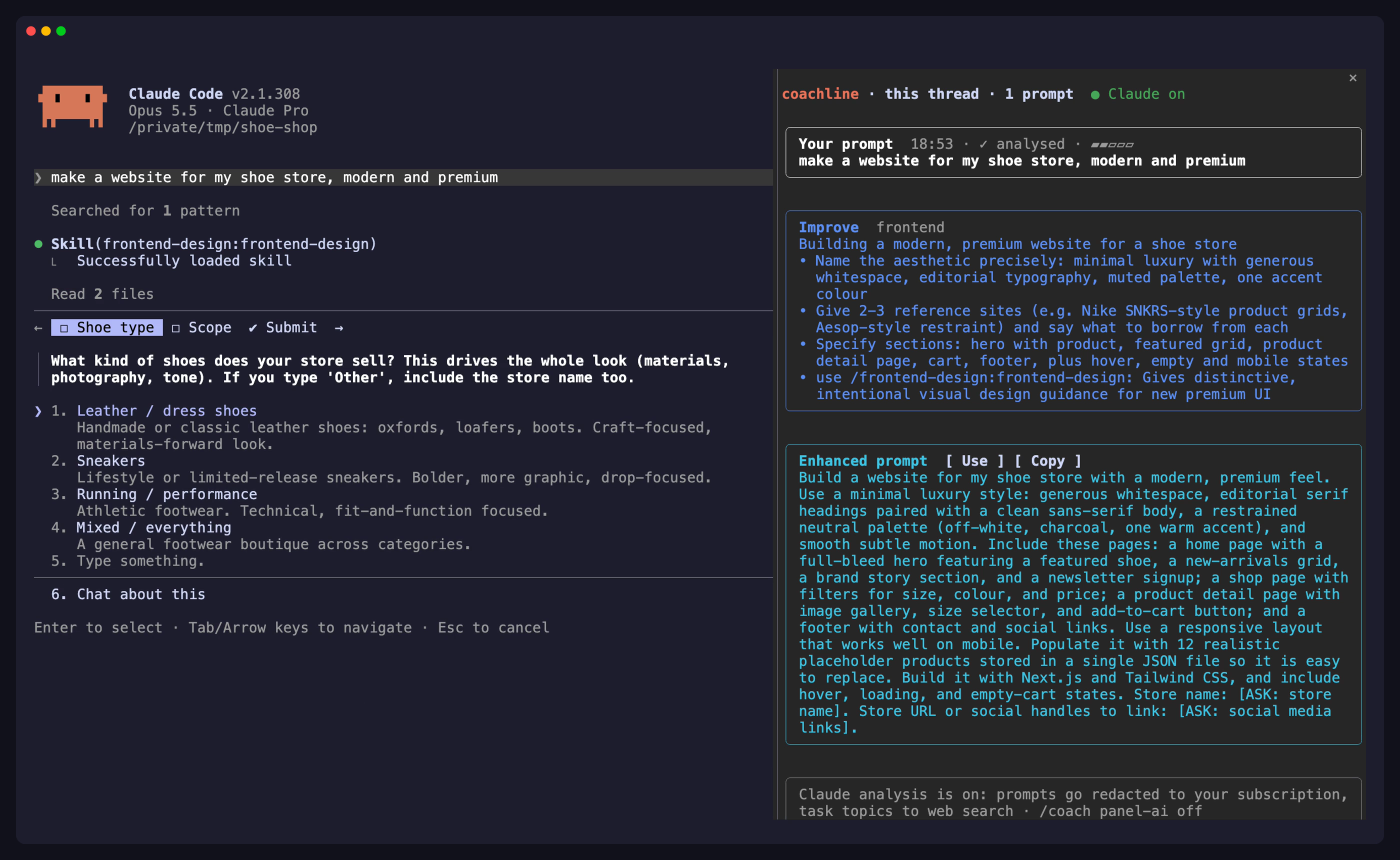
While Claude works on your prompt, coachline asks Claude separately, on your subscription, what the prompt leaves out.
- Concrete tips, and the skills and plugins you already have that fit.
- An enhanced prompt, with
[ASK: …]where only you know the answer. - For something new: tools, docs and reference sites from the web, each link checked first.
╭─ Your prompt ── 22:35 · ✓ analysed · earlier prompt, G = newest · … ─╮ │ fix the login bug, users can't sign in │ ╰──────────────────────────────────────────────────────────────────────╯ ╭─ Improve ──────────────────────────────────────────────── debugging ─╮ │ a login failure with no details │ │ • Paste the error and the steps that trigger it. │ │ • Name the file or route, e.g. src/auth/login.ts. │ │ • Say what fixed means: a test that fails now and passes after. │ │ • use /systematic-debugging: find the cause before changing code │ ╰──────────────────────────────────────────────────────────────────────╯ ╭─ Enhanced prompt ───────────────────────────────────────── c Copy ─╮ │ Fix the login bug: [ASK: what happens, e.g. the error or status │ │ code] when [ASK: the steps that trigger it]. │ │ │ │ Find the cause in [ASK: the file or route, e.g. src/auth/login.ts] │ │ before changing anything, then write a test that fails now. │ │ │ │ Done when: that test passes and the existing auth tests still pass. │ ╰──────────────────────────────────────────────────────────────────────╯ ─────────────────────────────────────────────────────────────────────── 2 patterns from your past chats · i to read · s installs a skill ─────────────────────────────────────────────────────────────────────── Prompts in this thread ▾ ✓ 22:23 add a size picker to the product page › ✓ 22:35 fix the login bug, users can't sign in ✓ 22:46 make the shoe site look more premium
╭─ Your prompt ── 22:35 · ✓ analysed ·… ─╮ │ fix the login bug, users can't sign in │ ╰────────────────────────────────────────╯ ╭─ Improve ────────────────── debugging ─╮ │ a login failure with no details │ │ • Paste the error and the steps that │ │ trigger it. │ │ • Name the file or route, e.g. │ │ src/auth/login.ts. │ │ • Say what fixed means: a test that │ │ fails now and passes after. │ │ • use /systematic-debugging: find the │ │ cause before changing code │ ╰────────────────────────────────────────╯ ╭─ Enhanced prompt ─────────── c Copy ─╮ │ Fix the login bug: [ASK: what happens, │ │ e.g. the error or status code] when │ │ [ASK: the steps that trigger it]. │ │ │ ╰─ ▾ PgDn for more ──────────────────────╯ ───────────────────────────────────────── 2 patterns from your past chats · i to re… ───────────────────────────────────────── Prompts in this thread ▾ ✓ 22:23 add a size picker to the produ… › ✓ 22:35 fix the login bug, users can't…
Use puts it in your prompt box
One press and the enhanced prompt replaces your draft, its gaps in bold. You fill them in and send it yourself.
- Nothing is ever sent for you.
- A draft already in the box is replaced only on a second press.
- In the Claude Code pane, the desktop app and your editor.
Copy it, anywhere
The standalone panel runs beside any terminal: Windows Terminal, or /coach watch. There, c copies the enhanced prompt to paste into Claude Code.
- The arrow keys move through every prompt of the conversation.
ishows habits Claude spotted in your history, andsturns a repeated request into a skill.
╭─ Your prompt ─────────────────────────── 22:53 · ✓ analysed · ▰▱▱▱▱ ─╮ │ commit this and open a pr with a good description │ ╰──────────────────────────────────────────────────────────────────────╯ ╭─ Improve ────────────────────────────────────────────────────── git ─╮ │ commit and pull request │ │ • Say which changes belong in this commit. │ │ • Name the base branch and any reviewers. │ ╰──────────────────────────────────────────────────────────────────────╯ ╭─ Enhanced prompt ─────────────────────────────────────── ✓ Copied ─╮ │ Commit the size picker changes only (not the styling work) with a │ │ conventional commit message, push the branch and open a PR against │ │ main. │ │ │ │ The PR description says what changed, why, and how it was tested. │ ╰──────────────────────────────────────────────────────────────────────╯ ─────────────────────────────────────────────────────────────────────── 2 patterns from your past chats · i to read · s installs a skill ─────────────────────────────────────────────────────────────────────── Prompts in this thread ✓ 22:23 add a size picker to the product page ✓ 22:35 fix the login bug, users can't sign in ✓ 22:46 make the shoe site look more premium › ✓ 22:53 commit this and open a pr with a good description
╭─ Your prompt ── 22:53 · ✓ analysed ·… ─╮ │ commit this and open a pr with a good │ │ description │ ╰────────────────────────────────────────╯ ╭─ Improve ──────────────────────── git ─╮ │ commit and pull request │ │ • Say which changes belong in this │ │ commit. │ │ • Name the base branch and any │ │ reviewers. │ ╰────────────────────────────────────────╯ ╭─ Enhanced prompt ───────── ✓ Copied ─╮ │ Commit the size picker changes only │ │ (not the styling work) with a │ │ conventional commit message, push the │ │ branch and open a PR against main. │ │ │ │ The PR description says what changed, │ │ why, and how it was tested. │ ╰────────────────────────────────────────╯ ───────────────────────────────────────── 2 patterns from your past chats · i to re… ───────────────────────────────────────── Prompts in this thread ▴ ✓ 22:46 make the shoe site look more p… › ✓ 22:53 commit this and open a pr with…
Keep the prompts that worked
When a prompt's turn finishes and your next two prompts don't correct it, it's kept, redacted, on your machine.
- Type something like it later and the hint says
similar prompt worked before. - The Library puts it back in the box, or copies it.
- coachline also notes when you stop a turn or say "no, I meant…", and shows how often vague prompts led to rework.
╭─ Library ─────────── 3 saved in this project · c copies · x forgets ─╮ │ add pagination to the orders table with 25 rows per page, keep the │ │ current sort, done when the orders e2e test passes │ │ › write a migration that adds an index on events.created_at in │ │ postgres and show the query plan before and after │ │ fix the flaky checkout test in tests/checkout.spec.ts: find why it │ │ times out on CI, no retries, done when it passes 10 runs │ ╰──────────────────────────────────────────────────────────────────────╯ ─────────────────────────────────────────────────────────────────────── 2 patterns from your past chats · i to read · s installs a skill ─────────────────────────────────────────────────────────────────────── Prompts in this thread ✓ 22:23 add a size picker to the product page ✓ 22:35 fix the login bug, users can't sign in ✓ 22:46 make the shoe site look more premium › ✓ 22:53 commit this and open a pr with a good description
╭─ Library ── 3 saved in this project … ─╮ │ add pagination to the orders table │ │ with 25 rows per page, keep the │ │ current sort, done when the orders │ │ e2e test passes │ │ › write a migration that adds an index │ │ on events.created_at in postgres and │ │ show the query plan before and after │ │ fix the flaky checkout test in │ │ tests/checkout.spec.ts: find why it │ │ times out on CI, no retries, done │ │ when it passes 10 runs │ ╰────────────────────────────────────────╯ ───────────────────────────────────────── 2 patterns from your past chats · i to re… ───────────────────────────────────────── Prompts in this thread ✓ 22:23 add a size picker to the produ… ✓ 22:35 fix the login bug, users can't… ✓ 22:46 make the shoe site look more p… › ✓ 22:53 commit this and open a pr with…
Watch it work
Install is recorded in the real Claude Code on macOS, with a demo login and a throwaway project. A new task is an illustration with made-up data.
Two commands. The pane opens beside the conversation: no restart, no API key.
Illustration with made-up data: a skill you already have, then tools and reference sites from the web, each shown only once its link loads.
Wherever you run Claude Code
The pane takes on the look of where it opens, light or dark.


- Terminal on macOS and Linux
- Windows Terminal
- Claude desktop app
- VS Code, Cursor, Windsurf, Antigravity
- JetBrains and any terminal, with
/coach watch
What happens to your prompts
Exactly this, and nothing else.
- What is sent
- Each prompt you send, redacted, with up to five earlier prompts of the same conversation as context. Pasted text never: only its marker.
- Which model, on whose account
- Claude through your own Claude Code login: Haiku by default, Sonnet for web research. Change either with
/coach model. No API key, no server of ours, no telemetry. - Redacted before it is sent
- Emails, keys and tokens are removed first, and pasted text is never sent. List a project in
llm-off.txtto keep it out entirely. - Checked on your machine
- Counts are recomputed locally, skill names must exist, and every link must load before you see it.
- Deleted in one command
/coach forget alldeletes what it keeps./coach panel-ai offleaves only the local hints.- Read the details
- Every case, with what stays on your machine: privacy and accuracy.
Your next prompt, coached.
Free and open source under the MIT licence. Needs Claude Code and Python 3.9 or newer.
> /plugin marketplace add teransarathchandra/coachline> /plugin install coachline@coachline